
ONLINE STORE
FREE SHIPPING NATIONALLY


Blackmagic
Blackmagic Cloud Store Mini 8TB: High-Speed Network Storage Solution
Blackmagic Cloud Store Mini 8TB: High-Speed Network Storage Solution
Couldn't load pickup availability
SKU:
Blackmagic Cloud Store Mini 8TB: High-Speed Network Storage Solution
The Blackmagic Cloud Store Mini 8TB is a compact, high-performance network-attached storage (NAS) device engineered specifically for video production workflows, multi-cam editing, and real-time collaboration in DaVinci Resolve. Designed in a quiet 1U half-rack chassis, it bridges the gap between portable field storage and fast central server pipelines.
RAID 0 NVMe Memory Engine and Network Throughput
The internal storage array of the Cloud Store Mini is built around four M.2 NVMe SSDs operating in parallel RAID 0. This parallel architecture ensures high read and write throughput, capable of saturating the built-in 10G Ethernet port to its theoretical speed limits. The system is designed to handle multiple simultaneous editing clients accessing uncompressed 4K, 6K, or 8K cinema camera formats concurrently without dropouts or latency.
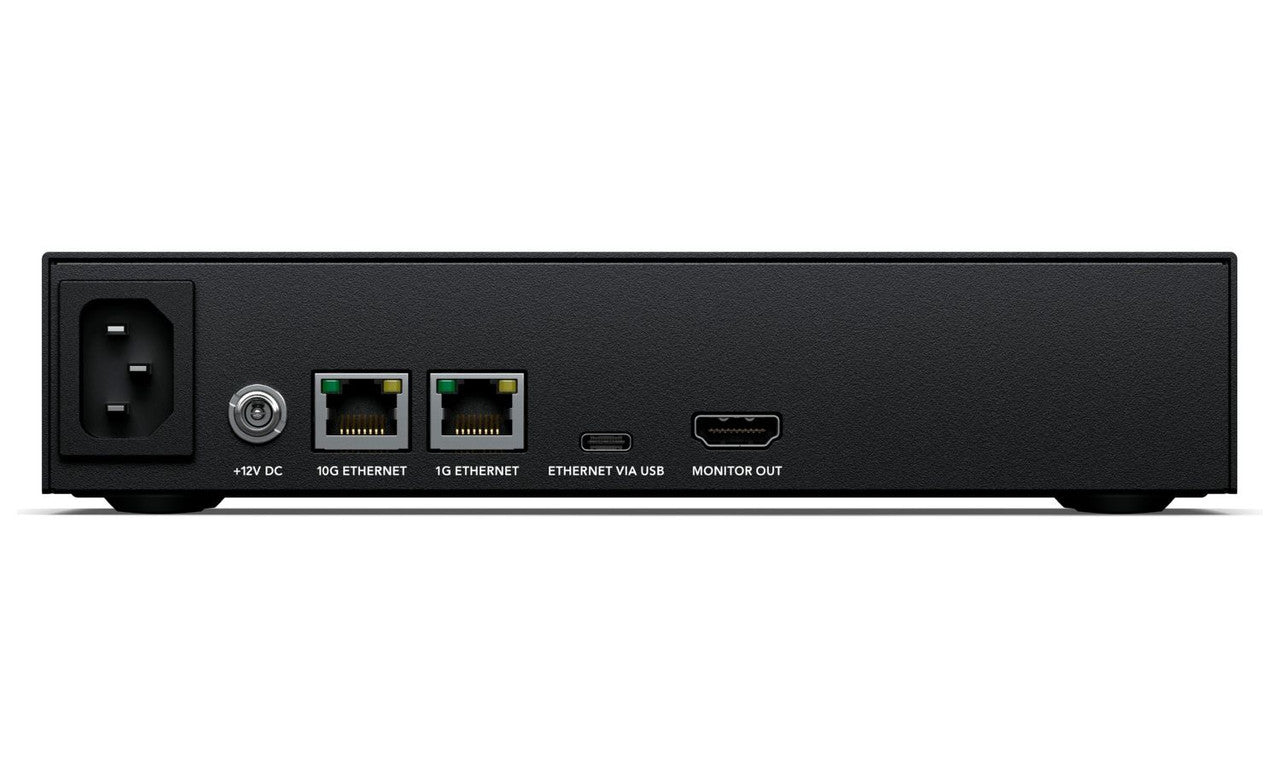
Networking features a dual-port setup, including a 10G BASE-T Ethernet port for high-bandwidth editing workstations and a 1G BASE-T Ethernet port for internet access or connecting slower network devices. Additionally, the chassis includes a USB-C port that supports Ethernet-over-USB, enabling laptop users without native Ethernet adapters to connect directly to the storage array using a standard USB cable.
Real-Time HDMI Status Monitoring and Cloud Sync
A standout feature of the Cloud Store Mini is its HDMI Monitoring Output. Connecting a standard TV or monitor displays a real-time graphical dashboard showing a storage map illustrating read and write activity, live throughput metrics for network connections, an active user list identifying connected client computers, and live cloud sync progress.
The internal firmware supports automated background synchronization with Dropbox and Amazon S3 cloud services. Projects can sync proxy files or full-resolution footage globally between multiple Cloud Store units, giving editors on different continents immediate access to local copies of project media.
Hardware Interfacing and Power Specifications
The unit features a whisper-quiet internal thermal management fan, making it suitable for desktop placement or acoustic-sensitive editing suites. For hardware reliability, the system incorporates dual power inputs: a standard AC mains socket alongside a locking 12V DC power connector for redundant supply or mobile battery power.
Technical Specification Overview
| Feature | Detail |
| Total Storage Capacity | 8 TB (4 x 2 TB M.2 NVMe SSDs in RAID 0) |
| Network Protocol | SMB (Server Message Block), up to 50 simultaneous connections |
| High-Speed Network | 1 x 10G BASE-T Ethernet (100M/1G/2.5G/5G/10G) |
| Standard Network | 1 x 1G BASE-T Ethernet |
| Computer Interface | 1 x USB-C (Supports Ethernet-over-USB up to 5 Gb/s) |
| Monitoring Interface | 1 x HDMI Type-A Output (1080p50 / 59.94 / 60) |
| Cloud Integration | Dropbox and Amazon S3 |
| Software Utilities | Blackmagic Cloud Setup Utility, Proxy Generator Lite |
| Power Inputs | 1 x IEC C14 Mains (100-240V AC) and 1 x 12V DC Locking Barrel |
| Power Consumption | 35 Watts |
| Form Factor | 1U Half-Rack Width |
See manufacturer website for specific product warranty information.
Share

NEED LARGE QUANITITIES?
For large quantity bulk orders
or
International orders (outside Australia) please contact us prior to ordering.
We have additional products not listed online.
For items not listed here, please contact us.
Warranty
For the best performance and to ensure your new product works perfectly with your existing setup, we strongly recommend having a professional audiovisual technician install and configure your equipment.
Professional installation provides several key benefits:
Optimal Performance: An experienced technician will properly calibrate and fine-tune your new component to achieve the highest possible audio and video quality. They can also ensure seamless integration with your current system.
Trouble-Free Setup: AV equipment can be complex. A professional will handle the setup efficiently and safely, preventing any potential damage to the product or your space.
Peace of Mind: Knowing your equipment is installed correctly gives you confidence that it will function reliably for years to come.
Understanding Product Warranties
Your product is covered by a manufacturer's warranty.
This means that any warranty claims, service requests, or repairs must be handled directly through the manufacturer.
To ensure your warranty remains valid, it is crucial that you follow the manufacturer's warranty guidelines and instructions.
These guidelines often specify requirements for installation, use, and maintenance. Failure to follow them could void your warranty.
You can find the specific warranty information and contact details for your product in the documentation on the manufacturer's website.
It is always a good idea to register your product with the manufacturer after purchase, as this can simplify the process if you ever need to make a warranty claim.
If you have any questions about your new equipment or need a recommendation for a professional installer, please don't hesitate to contact us. We're here to help you get the most out of your purchase.
